Published
CA Practice Management
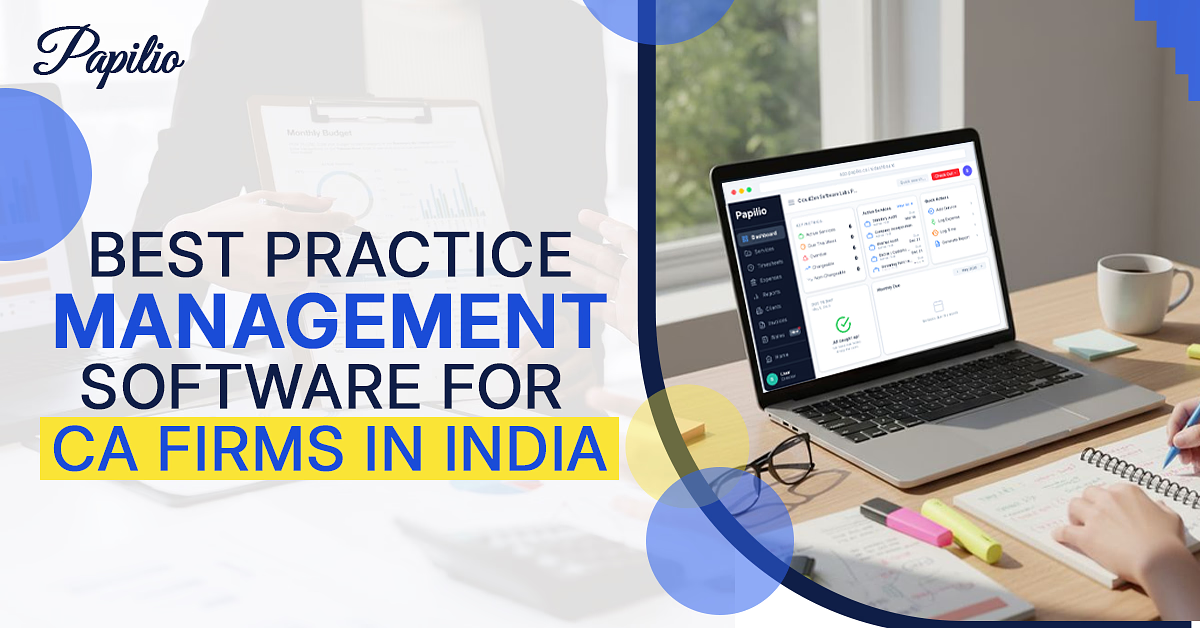
Best Practice Management Software for CA Firms in India
Managing a modern CA practice in India is getting harder by the day. Firms juggle hundreds of compliance tasks (GST, TDS, ITR, ROC, audits, etc.), deadlines, and client requests — often with nothing more than Excel sheets, emails, and WhatsApp. In fact, studies show that most modern accounting firms lose 15–25% productivity due to manual task tracking and scattered communication, simply because they lack unified tools. The results: overloaded partners, stressed teams, missed deadlines and penalties, and frustrated clients.
This is where Practice Management Software (PMS) comes in. In this article we'll explain exactly what CA practice management software is, why Indian CA firms need it, what key features to look for, and how to choose the right solution. We'll highlight the benefits, warn about common pitfalls, and even peek into future trends.
What is Practice Management Software for CA Firms?
A CA practice management software is a digital command-center for your entire firm. Rather than juggling multiple disjointed tools or relying on memory, everything is in one system:
- Client Management — centralized database of all clients, contacts, and engagement history (GST numbers, PANs, entities).
- Task & Workflow Management — automatic task lists and checklists for every service or filing (for example, recurring GST or TDS filings), with ownership, deadlines, and reminders.
- Compliance Tracking — a built-in calendar of all due dates (GST, tax returns, ROC, audits, filings, reports) with alerts so nothing slips through the cracks.
- Document Management — secure file storage (returns, correspondence, invoices, etc.) organized by client/service, often with e-signature support.
- Billing & Invoicing — time tracking, expense logging and invoice generation tied directly to client work, to streamline billing and cash flow.
- Team Collaboration — shared workspaces where partners, managers and associates see assignments, comment on tasks, and track progress together.
In effect, practice management software acts as the backbone of your firm, organizing everything so accountants can focus on delivering value to clients. It's often cloud-based, giving access anytime/anywhere and making remote collaboration seamless. In short, it replaces fragmented spreadsheets, sticky notes, and chat threads with one unified system.
Why CA Firms in India Need Practice Management Software
Running a CA firm in India means keeping track of a large number of moving parts. A single client may need GST filings, TDS returns, income tax work, audit support, ROC compliance, notices, document collection, financial reports, and regular follow-ups.
For many firms, the day still begins with Excel sheets, WhatsApp messages, diaries, email reminders, and verbal updates from team members. These methods are familiar, and they may work for a small team with a limited client base. But they become harder to manage when the firm grows. A partner may know exactly what is pending, but that knowledge often sits in their head, in scattered files, or across different message threads.
A document may be available, but stored in an email thread or chat where others cannot find it quickly. These gaps may look small on a normal day, but near compliance deadlines, they can create delays, duplication, and unnecessary stress.
| Common Manual Process | What Usually Goes Wrong |
|---|---|
| Tracking due dates in Excel | Sheets need constant updating and can easily become outdated |
| Assigning work over WhatsApp | Instructions get buried under newer messages |
| Maintaining documents in folders and email | Teams spend time searching instead of completing work |
| Checking progress through calls or messages | Partners lose time on repeated follow-ups |
| Depending on one person for task memory | Work continuity suffers when that person is unavailable |
Practice management software helps CA firms reduce this dependency on scattered systems. It brings client work, task allocation, due dates, documents, reminders, and internal updates into one place. Instead of checking five different channels to understand the status of work, partners and teams can see what is pending, what is completed, and what needs attention.
For a CA firm, this matters because most work is recurring. GST returns, TDS filings, tax deadlines, audit checklists, and compliance follow-ups do not happen once. They repeat month after month, quarter after quarter, and year after year. When these workflows are managed manually, the team has to recreate the same effort again and again. With practice management software, recurring work can be planned, assigned, tracked, and reviewed with far better control.
For Indian CA firms, the need is clear. Compliance work is increasing, client expectations are rising, and manual tracking has limits. A structured practice management system helps firms work with more control, fewer missed updates, and better accountability across the team.
Key Features to Look for in Practice Management Software
When evaluating tools, focus on features that address the above challenges. Key capabilities include:
- Client Database — a single, searchable client record for each firm, storing contact details, GST/PAN, engagement history and notes. This centralizes knowledge (no more looking up info in emails).
- Workflow/Task Automation — pre-built task lists and templates for every service (e.g. GST return, audit, company registration). The system should let you set up recurring workflows and auto-generate tasks. For example, Papilio offers a library of statutory templates so you can start quick and ensure all steps are covered.
- Compliance Calendar & Alerts — automated tracking of all deadlines. The PMS should display upcoming due dates for GST, TDS, ITR, ROC, etc., and send alerts as dates approach. This way, nothing is missed.
- Document Management — secure cloud storage for all client files, organized by client and service. Look for version control and audit trails. Bonus if the software supports e-signatures or client portals for collecting docs digitally. No more digging through inboxes!
- Time Tracking and Billing — built-in timesheets and expense logs linked to client work. The system should automatically generate invoices (hourly or fixed-rate), send payment reminders, and track receivables. This ensures you capture all billable time and invoice promptly.
- Reporting & Dashboards — real-time analytics on practice health. Good PMS tools give dashboards (active jobs, overdue tasks, staff utilization, revenue by service, etc.) so owners can spot bottlenecks or revenue opportunities.
- Role-Based Access & Collaboration — the software should let you assign roles/permissions (partner, manager, associate) so team members see what they need. Built-in chat/comments avoid back-and-forth emails.
- Integration — look for options to integrate with your accounting software (Tally, QuickBooks, etc.) and with government portals if possible (for direct filings). Also consider email/calendar integration for seamless scheduling.
- Security & Data Protection — given the sensitivity of financial data, ensure the platform uses bank-grade encryption and has strong backup/DR policies.
Papilio highlights features like centralized client management and communication, automated compliance tracking, document management and secure file sharing, and team collaboration and task assignment as core pillars. In short, the best CA practice software isn't just a project tool — it's built around the specific needs of accounting and compliance.
How to Choose the Right Practice Management Software
Choosing the right practice management software is not just about comparing feature lists. For CA firms, the right tool should match the way the team handles compliance, clients, deadlines, billing, and internal accountability. With many options available, follow a structured approach:
Audit Your Pain Points
Start by listing your biggest workflow challenges. Are you missing GST deadlines? Losing track of which associate has which tax return? Spending too much time compiling documents? Having clarity on your needs will guide feature selection.
Prioritize Must-Have Features
Based on your audit, make a checklist. At minimum, ensure the software has reliable compliance tracking (GST, TDS, ROC) and workflow automation. Key features often include client management, billing, and team collaboration as well. For Indian firms, local compliance support is crucial.
Ease of Use
Don't pick the most feature-packed tool if it's unusable. If the interface is confusing or has a steep learning curve, your team won't adopt it. Test the software hands-on (via free trials or demos) and see if your staff find it intuitive. Industry guides warn against ignoring ease of use — choosing a system that staff won't actually use is a common, costly mistake.
Scalability & Pricing
Make sure the pricing model makes sense for your firm size. Many tools charge per user per month (e.g. Papilio is ₹150/user/month), but some offer flat rates. Calculate the total cost of ownership (TCO) over 3–5 years, including future growth. Beware of pricing surprises — e.g. per-user add-ons or storage fees — that can balloon costs later. Industry experts warn not to choose software based solely on price to the exclusion of key features.
Cloud Accessibility
Especially today, cloud-based solutions are preferred. If you have remote or flexible work, a cloud PMS avoids bottlenecks that desktop-only systems create. Confirm the vendor's uptime guarantees and data security standards (SOC 2, GDPR, etc.).
Support & Onboarding
Good customer service is vital. Look for vendors that offer training or dedicated support during setup. CA firms shouldn't be left to fend for themselves — a helpful onboarding team can make or break the implementation.
Free Trial / Demos
Always pilot the software with real data or scenarios. A trial lets you check how the system handles your typical tasks (loading 5–10 clients through a mock GST cycle, for example). Test multi-client workflows and portal integration (GSTN sync, etc.) in advance.
By following these steps, you can narrow down the field to the solution that truly fits your firm's needs and culture.
Benefits of Using Practice Management Software for CA Firms
Investing in a practice management system delivers tangible improvements across a firm. Once routine work, compliance tracking, team responsibilities, and client updates move into one system, the benefits show up in daily operations as well as long-term growth. Here are the key benefits CA firms can expect:
- Greater Efficiency & Productivity — automating repetitive tasks frees up staff. Auto-generated compliance checklists and reminders mean teams spend less time on grunt work. Papilio reports firms see faster turnaround and reduced manual effort through automation.
- Fewer Missed Deadlines — with built-in calendars and alerts, you drastically cut the risk of penalties. One CA partner notes Papilio has transformed how we manage our CA practice, with automation features saving hours every week on compliance work.
- Better Team Collaboration — every task has an owner and status. Managers can easily reassign or follow up. No more chasing people — the system shows what's done and what's pending. This transparency leads to faster project cycles.
- Enhanced Client Service — clients benefit indirectly: faster responses, consistent follow-through, and fewer excuses for delays. Centralized client histories mean you can answer questions quickly. Happier clients are more likely to stay and refer you new business.
- Improved Profitability — by accurately tracking time and automating invoicing, firms capture all billable hours and reduce leakage. Plus, with dashboards you can see which services or clients are most profitable and adjust strategy accordingly.
- Scalability — once processes are standardized in software, adding new clients or staff is smoother. Papilio claims firms can handle more clients with ease without proportional headcount increases.
- Error Reduction — structured workflows and templates minimize human errors (typos, wrong formulas, missed steps). When knowledge lives in the system instead of an associate's head, consistency goes up.
- Data-Driven Insights — at a glance you see workload distribution and bottlenecks. Papilio's dashboards give real-time insights into your services, deadlines, and team activity — all in one place. Better visibility means smarter decisions.
In short, a CA practice management platform turns a manual, reactive office into a proactive, reliable service firm. The right practice management software can significantly improve efficiency and client service.
Common Mistakes to Avoid While Selecting Software
When evaluating software, CA firms often fall into the same traps. Be aware of these pitfalls:
"Feature FOMO"
Paying for bells & whistles you won't use. It can be tempting to choose a solution with every shiny feature, but if 95% of your clients are domestic GST-only, a complex multi-currency module is wasted. Only commit to features that match your actual needs.
Ignoring Total Cost of Ownership (TCO)
A low monthly quote can hide the long-term cost. Some tools charge extra per user or per module. For instance, Papilio is ₹150/user/month, which is transparent, but other vendors may double in price as you add staff. Always calculate 3–5 year costs.
Choosing Desktop-Only Solutions
Firms that allow remote work or multiple offices should avoid software locked to one PC. If your associates work from home, desktop lock-in creates bottlenecks. The safer bet is cloud software accessible on any device.
Neglecting Ease of Use
Don't buy a complex system and force your team into it. One common regret is picking software so complicated it's never properly used. Look for a clean interface and strong user training.
Treating Practice Management as Optional
Some small firms think they can manage with Excel and WhatsApp until later. But this often backfires: at a certain scale (even ~20–30 clients), the manual approach fails. Beyond roughly 25 clients, missed deadlines become inevitable. In short, don't wait for problems to force a switch.
Poor Vendor Support
Another mistake is underestimating implementation effort. If you're not a tech firm, avoid vendors with weak onboarding. Ensure the company offers good training, documentation, and support to help your team through the transition.
Keeping these in mind — and learning from others' experiences — will help you pick the right tool without regrets.
Future Trends in CA Practice Management Software
The future of CA practice management is being shaped by a few clear trends:
- AI & Automation — emerging tools are adding AI features: auto-filling forms, flagging discrepancies, and giving workflow suggestions. Expect more tools to auto-fill forms, flag compliance risks, and recommend next steps as AI matures.
- Cloud-First & Remote Work — the shift to cloud is irreversible. Practices now want full access from home, client sites or on mobile. "Cloud everything" is becoming the norm, and mobile apps and dashboards on phones are increasingly common, so you can manage your practice even during tea breaks.
- Digital Documents & E-Signatures — paperless offices are here. Online document collection, client portals, and integrated e-signatures are replacing printing. Future PMS solutions will make digital engagement seamless, from tax organizers to audit workpapers.
- Integrations with Other Systems — expect tighter integration with accounting software (Tally, Zoho Books), payroll, CRM systems, and even direct connections to GSTN/IT portals. Seamless integrations that auto-sync data eliminate double data entry.
- Enhanced Analytics — beyond basic dashboards, more advanced analytics and forecasting will appear. Some vendors already offer predictive insights (e.g. warning of unusual compliance patterns). Over time, expect PMS tools to help you proactively manage workload and even identify business opportunities through data.
In essence, the CA practice of the near future will be even more digital. Firms adopting these trends will be better equipped to respond to fast-changing regulations and client demands. Firms that prioritize integrated software solutions realize greater long-term benefits by mitigating data silos and redundant manual efforts.
Conclusion
The days of using dozens of disconnected spreadsheets, chat threads and memory to run a CA practice are ending. Best-in-class firms in India are now using practice management software to bring order, efficiency and growth to their offices. By centralizing client info, automating workflows, and tracking every compliance step, these tools eliminate much of the grunt work that traditionally slows CAs down. The benefits are clear: fewer missed deadlines, higher team productivity, and the ability to serve more clients without burning out.
In summary: practice management software is no longer a luxury for CA firms in India — it's a necessity. It's the difference between constantly reacting to chaos or proactively running a well-oiled firm.
Frequently asked questions
Common questions about the best practice management software for CA firms in India, including features, cost, and why firms need it.
Which is the best practice management software for CA firms in India?
Papilio is designed specifically for Indian CAs and is trusted by 500+ firms. As one of the best practice management software options for CA firms in India, it is built around CA firm workflows. It helps manage client records, task allocation, compliance deadlines, document storage, billing, reporting, and team visibility from one platform.
What features should CA firms look for in management software?
CA firms should look for client management, task and workflow automation, GST, TDS and ROC compliance tracking, document storage, billing, invoicing, reporting, and team collaboration. Papilio includes these features so firms can track work, assign responsibilities, manage deadlines, and reduce dependence on spreadsheets or WhatsApp updates.
Why do CA firms need practice management software?
CA firms need practice management software because manual tracking becomes risky when the number of clients, filings, and team members increases. Papilio helps firms reduce missed deadlines, improve accountability, centralize client work, and make daily operations easier to monitor.
What is practice management software for CA firms?
Practice management software is a digital system that helps CA firms manage clients, tasks, compliance calendars, documents, billing, reporting, and team workflows. Papilio works as a centralized platform where firms can see what work is pending, who is responsible, and which deadlines need attention.
How much does CA practice management software cost in India?
Costs vary by product and plan. Papilio's all-inclusive plan is ₹150 per user per month. CA practice management software usually depends on the pricing model, number of users, and included features. Papilio offers an affordable per-user pricing model, which allows smaller firms to start with essential practice management features and scale usage as the team grows.