Published
CA Practice Management
How CA Firms Can Track Employee Workload and Task Progress
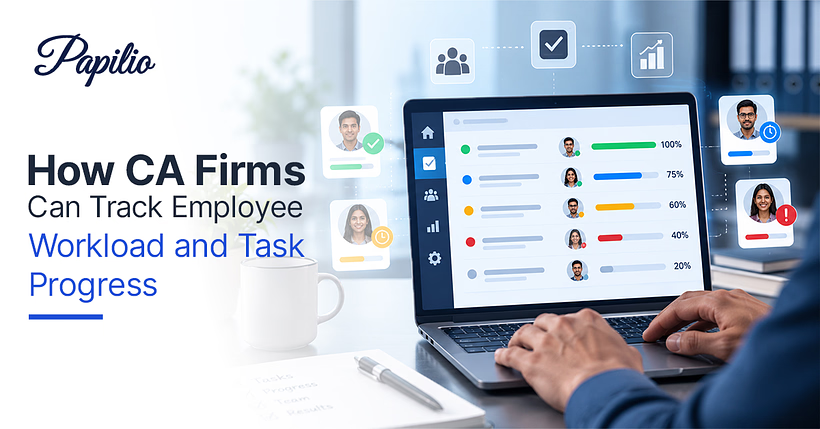
Running a CA firm is rarely about handling one task at a time. On any given day, a team may be working on GST filings, income tax returns, audits, client queries, reconciliations, bookkeeping and statutory deadlines often for several clients at once.
The challenge is not simply getting the work done. It is knowing who is working on what, how much work they already have, what is nearing its deadline and where something is getting held up.
When this visibility is missing, managers end up investing time in follow-ups. While this may work when the teams are handful, the same can become overwhelming as the practice grows.
This is where employee workload management for CA firms becomes important. A structured approach to tracking tasks and workloads can help partners and managers distribute work more effectively, identify bottlenecks early and keep client work moving without constantly checking in with employees.
Why Tracking Employee Workload Is Important for CA Firms
Workload management is particularly important in CA firms because the nature of the work changes throughout the year.
There are periods when the entire team may be working towards the same statutory deadline. During other months, the workload may be more evenly distributed. If managers do not have a clear view of these fluctuations, some employees can end up overloaded while others have room to take on more work.
Tracking workload helps solve this problem in a few practical ways.
It prevents work from piling up with one person
An employee handling several urgent tax filings may not have enough time to take on another client assignment. Without visibility into their existing workload, however, a manager may unknowingly assign more work to them.
A central task system makes the existing workload easier to see before assigning anything new.
It makes deadlines easier to manage
CA firms work around numerous deadlines. A missed deadline can affect both the client relationship and the firm's reputation.
Tracking task status and due dates gives managers an early indication of work that is falling behind instead of discovering the problem when the deadline is already close.
It improves resource allocation
Not every task requires the same level of expertise. Some assignments may need a senior team member, while others can be handled by a junior employee with appropriate supervision.
When managers understand everyone's current workload, they can assign work based on both availability and capability.
It reduces unnecessary follow-ups
Repeatedly asking, "Is this done?" or "How much is pending?" takes time for both managers and employees.
With proper task tracking, the status of an assignment can be updated and viewed without a separate conversation every time.
What Should CA Firms Track for Every Employee?
Simply counting the number of tasks assigned to an employee does not give a complete picture of their workload. Ten small bookkeeping tasks may take less time than two complex audit assignments.
A useful work management system should therefore capture more than task quantity.
CA firms can track:
- Tasks assigned: What work is currently allocated to the employee?
- Task type: Is it related to GST, income tax, audit, accounting, payroll or another service?
- Client: Which client does the task belong to?
- Priority: Is the task routine, important or urgent?
- Due date: When does the work need to be completed?
- Task status: Is it open, in progress, under review or completed?
- Estimated effort: How much time is expected to complete the task?
- Actual time spent: How long did the task actually take?
- Pending dependencies: Is the employee waiting for information, documents or approval?
- Reviewer or supervisor: Who needs to check the completed work?
This information gives managers a much more realistic view of employee capacity / utilisation.
e.g.: an employee with five tasks may appear less busy than someone with twelve. But if those five tasks include a statutory audit and two complex tax assignments, their actual workload could be considerably higher.
Excel vs CA Practice Management Software for Employee Task Tracking
Excel is often the first tool CA firms turn to when they want to organise employee tasks. It is familiar, inexpensive and easy to customise.
For a very small team, a well-maintained spreadsheet may be enough to start with.
The difficulty appears when the number of employees, clients and assignments increases.
With Excel, managers will have to manually update task statuses, share the latest version with the team and check multiple sheets to understand what is pending. There is also a greater chance of outdated information, duplicate entries or important tasks being overlooked.
Whereas a CA practice management software is designed specifically to provide a more structured way of managing this information.
| Excel | CA Practice Management Software |
|---|---|
| Tasks are usually updated manually | Tasks can be centrally managed |
| Information may be spread across sheets | Employee and client work can be viewed in one system |
| Limited visibility into overall workload | Easier workload visibility |
| Follow-ups are often manual | Task status can be updated and monitored |
| Difficult to scale across teams | Designed for growing firms |
| Reporting requires manual effort | Workload and task data can be easier to analyse |
This does not mean every CA firm needs to abandon spreadsheets overnight. But as the firm grows, dedicated CA firm task management software can make day-to-day coordination considerably easier.
How to Create a Workload Tracking System for a CA Firm
A useful system does not have to be complicated. The goal is to make work visible without creating another administrative burden for employees.
1. List recurring work
Start by identifying the types of assignments your firm handles regularly.
This could include GST returns, TDS, income tax returns, audits, bookkeeping, payroll, reconciliations, notices and client-specific assignments.
2. Assign every task to a clear owner
Every assignment should have one person responsible for moving it forward.
Multiple people may contribute to the same assignment, but there should be no confusion about who owns the task.
3. Add realistic deadlines
A due date should reflect both the statutory deadline and the firm's internal review process.
For example, if a return needs to be filed by a particular date, the internal deadline should give the reviewer enough time to check the work before filing.
4. Use clear task status
Keep status simple. For example:
Not Started → In Progress → Under Review → Completed
If a task is blocked because the client has not provided documents, that should also be visible rather than leaving the assignment marked as simply "pending."
5. Review workloads regularly
A weekly workload review can help managers identify employees who have too many high-priority assignments and redistribute work before deadlines become a problem.
6. Look at workload alongside deadlines
An employee with several tasks due to be delivered a week later may be manageable. However, the same number of tasks due the very next day will be a different situation.
Workload tracking should therefore consider volume, complexity, and urgency together.
Key Employee Workload Metrics CA Firm Managers Should Monitor
Once task information is being recorded consistently, managers can use it to understand how work is moving through the firm.
Some useful metrics include:
Tasks completed
The number of completed assignments over a specific period can provide a basic view of output.
However, this metric should not be considered on its own because tasks can vary in complexity.
Overdue tasks
A growing number of overdue assignments can indicate unrealistic deadlines, workload imbalance, delays in review or client dependency.
Average task completion time
Tracking how long different types of assignments take can help firms plan future workloads more realistically.
Pending tasks
The number of open assignments gives managers a quick view of the work still in progress.
Workload by employee
This shows how much active work is currently assigned to each team member and can help identify uneven distribution.
Tasks by priority
A team member may have many tasks, but only a few may be urgent. Looking at priority helps managers understand where immediate attention is required.
Rework or revision rate
If completed assignments frequently return for corrections, the issue may not be workload alone. It could indicate a training gap, unclear instructions, or insufficient review time.
The objective of these metrics should not be to monitor employees for the sake of monitoring them. The purpose is to understand how work is moving through the firm and where the process can be improved.
How Task Tracking Improves Productivity in CA Firms
Productivity in a CA firm is not simply about asking employees to complete more tasks. It is about reducing the time and confusion involved in getting those tasks completed correctly.
A structured task management system can help in several ways.
Employees know what needs attention. When priorities and deadlines are clear, employees spend less time figuring out what to work on next.
Managers can identify bottlenecks sooner. If an assignment remains stuck at the same stage for several days, it becomes easier to investigate the reason.
Reviews become more organised. Managers and seniors can see which assignments are ready for review instead of relying on individual messages.
Work can be reassigned when necessary. If one employee is overloaded while another has capacity, managers have better information to make the change.
Client work becomes easier to coordinate. Tasks, deadlines and documents can be organised around individual client assignments rather than scattered across different channels.
Ultimately, good task management tools give employees clarity while giving managers visibility.
How CA Practice Management Software Helps Track Employee Workload
As a CA firm expands, managing assignments through spreadsheets, email threads and messaging applications can become difficult.
CA practice management software brings task and client work into a centralised and structured environment.
Depending on the platform, firms can use it to assign tasks, set deadlines, monitor progress and view employee workloads. Instead of asking each employee for an update, managers can refer to the current task status.
It can also make it easier to connect employee tasks with the client or assignment they relate to.
For example, rather than having a separate spreadsheet for GST work, another for audits and another for income tax assignments, a practice management system can provide a more centralised view of ongoing work.
This becomes particularly useful during busy periods when multiple deadlines overlap.
The bigger advantage is not just automation. It is visibility. When managers can see what is happening across the team, they can make decisions based on actual workload rather than assumptions.
Best Practices for Managing Employee Workload in a CA Firm
Good workload management comes down to creating a system that employees can actually follow.
Keep task ownership clear
Every task should have a defined owner. Avoid situations where everyone assumes someone else is handling an assignment.
Prioritise deadline-sensitive work
Not every task needs immediate attention. Use priority levels to distinguish statutory deadlines and urgent client requirements from routine work.
Avoid assigning work based only on availability
An employee may technically have free hours but still be unsuitable for a particular assignment because of skill requirements or the complexity of their current work.
Consider capacity, expertise and deadlines together.
Build review time into deadlines
A task is not necessarily finished when the preparer completes it. If a senior or partner needs to review the work, that time should be considered when setting internal deadlines.
Make blocked tasks visible
If an assignment is waiting for documents or client confirmation, record that clearly. Otherwise, an employee may appear to have an overdue task when the actual delay is outside their control.
Review workloads before peak periods
Before major filing or compliance periods, review each employee's workload and redistribute assignments where necessary.
Use workload data to plan future hiring
If the same workload pressures appear repeatedly despite redistribution, the firm may need additional resources. Historical task data can help partners make that decision with greater confidence.
Common Mistakes CA Firms Make When Tracking Employee Workload
Even when a firm starts tracking tasks, a few common mistakes can reduce the usefulness of the system.
Measuring only the number of tasks
Task count does not equal workload. Always consider complexity, effort and deadlines.
Treating every employee the same
A senior handling a complex audit and a junior completing routine bookkeeping cannot be evaluated using exactly the same workload expectations.
Tracking tasks but not deadlines
Knowing what employees are working on is useful. Knowing when that work needs to be completed is essential.
Creating too many status categories
A complicated tracking system can become another task for employees. Keep statuses simple enough to update quickly and consistently.
Not updating completed work
An outdated task board can be worse than having no system at all because managers may make decisions based on incorrect information.
Using tracking as surveillance
Employee task tracking should help managers balance workloads and improve processes, not create a culture where employees feel they are being watched every minute.
Ignoring why tasks are delayed
An overdue task does not automatically mean poor employee performance. The reason could be missing client documents, unclear instructions, a dependency on another team member or an unrealistic deadline.
The most useful workload system helps managers understand the reason behind the numbers, not just the numbers themselves.
How Papilio Helps CA Firms Manage Employee Workload
A CA practice management platform such as Papilio can help firms bring client assignments, employee tasks, deadlines and workflow management into one structured system.
Instead of relying on spreadsheets and repeated follow-ups, managers can use a centralised workflow to understand what work is assigned, what is pending and where attention is required.
Conclusion
Managing workloads becomes harder as a CA firm grows. A structured employee workload management for CA firms system helps track tasks, deadlines and capacity, making it easier to distribute work and avoid bottlenecks.
Whether using Excel or CA practice management software, the goal is simple: get the right work to the right person at the right time.
Frequently asked questions
Common questions about tracking employee workload and task progress in CA firms, including metrics, task distribution, productivity, and practice management software.
How do CA firms track employee workload?
CA firms can track workload by maintaining a central view of assigned tasks, deadlines, priorities, status and employee capacity. Practice management software makes this easier by providing real-time visibility across teams.
How can accounting firms track employee tasks?
Accounting firms can use task management tools to assign work, set deadlines, monitor progress and identify overdue tasks. This gives managers a clear view of responsibilities without relying on constant follow-ups.
What is the best way to monitor task progress in a CA firm?
The best approach is to use a centralized task tracking system where every task has an owner, deadline, priority and status. Regular reviews help managers identify delays and workload issues early.
How can CA firms distribute work among employees?
CA firms can distribute work based on employee availability, experience, workload and task complexity. Reviewing team capacity before assigning new work helps prevent certain employees from becoming consistently overloaded.
How do you measure employee productivity in a CA firm?
Employee productivity can be measured through completed tasks, turnaround time, deadline adherence, workload balance and rework rates. These metrics provide a more meaningful picture than simply counting how many tasks someone completes.
What metrics should CA firms use to measure employee workload?
Useful metrics include active tasks, completed tasks, overdue work, average completion time, workload by employee, task priority and rework rates. Together, these metrics help identify capacity issues and workflow bottlenecks.
Can practice management software track employee tasks?
Yes. CA practice management software can track assigned tasks, deadlines, status, priorities and progress. It can also connect tasks with specific clients, making it easier to manage work across the firm.
How can CA firms track GST and tax-related tasks?
CA firms can create recurring GST and tax tasks with specific deadlines, assign responsible employees and track their status. Centralized task management helps ensure compliance-related work is completed and reviewed on time.
How can CA firms prevent employees from becoming overloaded?
Firms can stop overload by checking what tasks are active how much each person can do and what is coming up. Work should be moved around when needed especially when there is a lot of work to do during times.
What is the difference between task tracking and workload management?
Task tracking is about what work's given and how it is going. Workload management is, about looking at what each person can do what is most important when things need to be done and how work is shared to keep everything.